- Status
- Experiment New and still being tried. Expect rough edges.
- Its job
- Takes an idea to a product that sells: design, prototypes, tooling, testing and launch, with the paperwork kept as it goes.
- In Grok
- The Project Manager Bot
- Before you add it
- It's free, it's new, and it runs on artificial intelligence. Check what it gives you; you make the decisions.
Your project manager for getting an invention made, from the first idea to a product that sells.
What it does
Runs an idea from the first conversation through design, prototypes, tooling, testing, and launch. Keeps the paperwork and says what's next.
Set it up in Grok
Add it from the ready-made bot.
- Open the Project Manager Bot template and add it to your Grok bots.
- Open the new bot. The first time, it installs the office on your account (a minute or two), then greets you.
- Say yes to the setup. It makes your project folder, connects your Google Drive (you sign in on a card it shows you) and checks that saving works. Then answer its questions, one at a time. If it ever goes quiet, ask "What's next?"
Tuned for you
Tuned for an inventor working on their own money. It helps you do the work yourself instead of sending you to professionals at every step, keeps rigor in line with whose money is at risk, and tests cheaply and early: fail forward faster, get it 90% right and go. When a step needs an expert, it says so plainly, and when money is short it suggests a short, often free check instead.
What it does for you
- Idea to a product that sells. Six stages: getting the facts, design, prototypes, tooling, approving production, and launch. Each stage has its own checks, and it tells you what's next. How it works
- A real project record you can see. A charter, a decision log, an action list, a costed bill of materials, a spending register, a risk analysis table and change notices. Written for your product, not pasted from a template. How it works
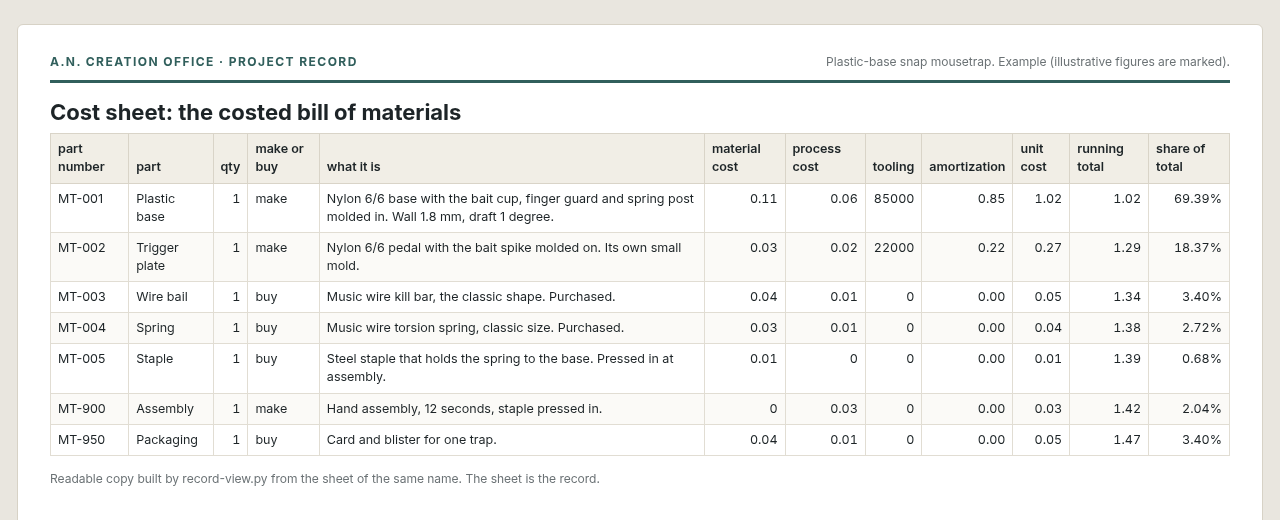
- What it costs to make. Each part with its material, process and tooling cost. Tooling is spread over the volume, giving a cost to make one and the price that pays the molds back. How it works
- Risks worked into the design. A risk analysis table for your product's own parts and steps, used while designing and then parked until something changes. How it works
- The right rules, found early. 26 screening questions (electrical, batteries, waterproof ratings, military, medical, children, food, drawings and more) pick the standards that apply, so you know where to look before you design. How it works
- Specs traced to their source. Requirements, ratings and tolerances are traced to the actual document, with its edition and clause, not to a bot's memory, and checked again before anyone builds, buys or tests on them. How it works
- Plant know-how built in. Plastic part design, injection molding, quality and manufacturing procedures from a career in product development and plant management, used behind the scenes. How it works
- Your money, tracked. What has been spent or committed, and whose money it was: yours, a grant, a loan, an investor. How it works
What it makes
Pages from the worked example, a plastic-base snap mousetrap. Figures marked illustrative aren't real quotes. Open one to see the whole document, or see the full example.
- Cost sheet. Each part's material, process and tooling cost, and the cost to make one.
- Risk analysis table. How it could fail, how bad and how likely, and the action taken on each.
- Action log. Who owes what and by when, with suggestions waiting their turn.
- Project charter. Scope, success criteria, milestones and budget.
What we learned
- Plant know-how doesn't need its own bots. Molding, plastic part design, quality and manufacturing started out as separate bots. Now this bot does that work from the same procedures, so there's one bot to set up.
- First scripted test run: 14 of 21 checks passed. The fixes were in setup. It now asks one question per message, asks about the routines on their own after the setup check, and reports the setup check with what it read back.
- Second round: 16 of 18. When pushed on whether an idea can be patented, it no longer opens with a bare yes or no, and it says that showing the idea early "could count" as making it public.
- Third round: the first time it reads your idea back, it uses two or three plain sentences, not a list.
Methods this bot uses
These methods are explained in more depth at hotbotspot, a separate reference library on tools for bots.
- APQP: from what the customer wants to what you check
- FMEA, the risk analysis table
- Should-cost: what it ought to cost
- Control plans
- Don't make it up
- Write it down or it didn't happen
Its sister bot
Starting a company around your invention? The Entrepreneur's Office Manager runs the business side: the plan, customers and invoices, money each month and the deadlines. The two share one folder.
Everything here is a starting point. Work with artificial intelligence always needs tuning, so test it and dial it in for your own work, data and model before you rely on it.